
Channel Economics
Compare manual scenarios for marketplaces, your owned store, and their combined result. Inspect cost drivers and save calculation versions.
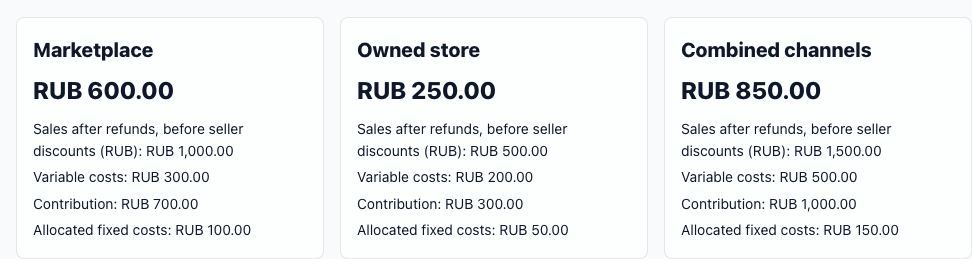
Three results, one model
The same formula shows revenue, variable costs, and allocated fixed costs for each channel. The combined total adds both channels without estimating customer cannibalization.
Move from an assumption to a source check
Calculate a scenario
Enter revenue, order counts, and cost categories for both channels. Add modeled customer acquisition when relevant.
Save a version
Save a named scenario, compare changes, and export the calculation as CSV or PDF.
Import owned-store records
Upload order and cost files in CSV, TSV, or Excel .xlsx format; review field mapping and preview before committing.
One workspace for every channel decision
Use the parts that match your data maturity. Core scenarios and file imports are available in Channel Economics; connected sources, cohorts, Store API, and AI appear only when enabled for your workspace.
Versioned scenarios
Compare marketplace, owned-store, and combined contribution. Save assumptions, formula version, source snapshot, and exportable results.
Scenario guideCSV and native Excel imports
Map owned-store orders and costs, preview rejected rows, prevent replay duplicates, and reconcile selected totals before commit.
Import guideSource health and evidence
Inspect period coverage, freshness, archived provider lineage, reconciliation warnings, and the exact evidence state behind a decision.
Evidence methodCAC, cohorts, LTV, and payback
Keep first-party identity scoped, show cohort maturity, and leave CAC or payback unavailable when customers, spend, or repeat behavior are incomplete.
Customer economicsConnected store sources
Use workspace-controlled Google Sheets, InSales, or signed Store API events. Accepted events and snapshots still require review before financial publication.
Connection guideGrounded decision brief
ProfitVena Intelligence explains validated drivers, break-even conditions, missing measurements, and next analysis without inventing unavailable facts.
AI evidence guideAvailability follows your workspace controls
Files, scenarios, connected sources, customer identity, marketplace evidence, and AI each have separate permissions and acceptance requirements. The interface shows only capabilities active for your workspace; a hidden control is not a failed import or zero result.
Keep estimates and observations separate
Imported orders appear separately and do not replace manual scenario assumptions. Known-cost summaries can be incomplete; check source coverage, returns, and recognition policy before making a financial decision.